
MoneyPilot : Class Action
Bloom ProcessingFinance
4.6211.00 Reviews
- Version
- 1.0.55
- Installs
- 50.00K
- Age Rating
- Everyone
Screenshots



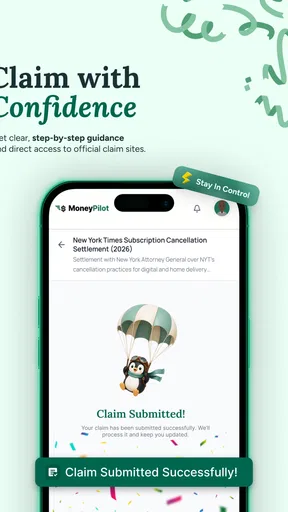
Our Review of MoneyPilot : Class Action
 Analysis by Appyee
MoneyPilot: Class Action is a finance app from Bloom Processing that focuses on a very specific problem: finding possible claims and helping users track them through the payout process. I approached it less like a general money manager and more like a search-and-follow-up tool for settlements that might otherwise be easy to overlook. That distinction matters, because its usefulness depends on whether you have time to review claim opportunities and keep your information organized, rather than on whether you want budgeting, banking, or investment tools.
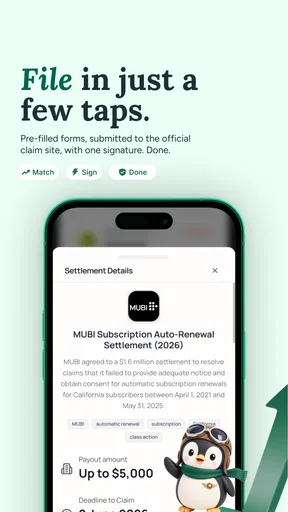
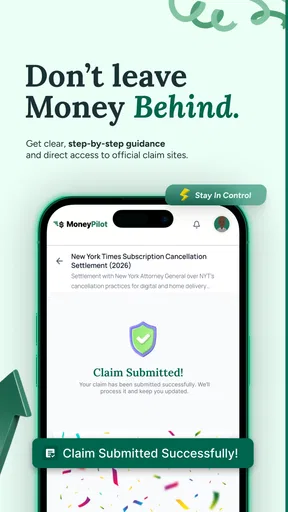
My first impression is that the app makes the idea of a claims finder feel more approachable than searching for settlement notices one by one. Its store summary points to three connected tasks: finding and tracking claims, submitting payout claims, and locating money and settlements. In everyday terms, the app is aimed at turning a vague “I may be owed something” feeling into a repeatable process. It is free to download, although in-app purchases range from a few dollars to higher-priced items, so I would pay attention to any purchase screen before agreeing to anything.
Why the claim-finding capability matters
The strongest part of MoneyPilot: Class Action is its narrow focus on claims that can be forgotten. A settlement opportunity is not useful simply because it exists; it has to reach the right person, be submitted correctly, and be followed until the claim is resolved. That is where a dedicated tool can be more practical than relying on occasional emails, social media posts, or a general web search.
I like the idea of separating this task from ordinary financial tracking. A budgeting app tells me where my money is going. A banking app shows transactions. A settlement-focused app addresses a different question: whether a company-related claim may require my attention. That makes MoneyPilot more relevant to people who want to check for possible compensation without turning the search into a regular research project.
The key benefit is not that the app magically creates money. It is that it can give a neglected administrative task a place in my routine. If I discover a claim, the value comes from being able to return to it, remember what stage it is in, and avoid treating the submission as a one-minute decision. The real advantage is follow-through, not just discovery.
This is also why I would not judge it by the standards of a traditional personal finance app. It is not the right substitute for expense categories, bill reminders, credit monitoring, or account balances. Its purpose is narrower, and that narrowness is useful when the problem is forgotten claims rather than everyday money management.
How I would use it without losing track
I would begin by treating every possible claim as something to review, not an automatic payout. When a listing looks relevant, I would read the eligibility requirements carefully, note the deadline, and check what information the submission asks for. The app can make the search and tracking side easier, but the final responsibility still belongs to me. A claim may involve purchase dates, account history, product use, location, or other details, and I would not guess simply to complete a form quickly.
A useful workflow is to check for relevant opportunities at a calm time, open only the claims that appear connected to my own history, and then deal with them in a separate sitting. That prevents rushed submissions and makes it easier to keep supporting details nearby. I would also save a personal note about what I submitted and when, rather than assuming that seeing a claim inside the app is the same as having completed it.
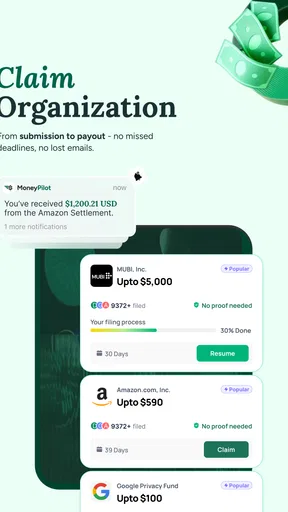
The tracking function is particularly important here. Claim processes can feel invisible after submission, and that is when many people stop paying attention. A tracker gives the task a continuing place in the app instead of leaving it buried in browser history or an inbox. Even without turning the process into a daily habit, I could use it as a monthly check-in: review open items, remove claims that no longer apply, and see whether anything needs action.
One practical tip is to separate “interesting” from “eligible.” A claim can sound familiar because I recognize the company or product, yet still not apply to me. I would use the app to build a shortlist, then verify the exact conditions before entering personal details. That small distinction reduces wasted time and helps avoid the common mistake of submitting based on a headline rather than the actual requirements.
A realistic everyday scenario
Imagine that I remember buying from several large retailers and using a few widely known services over the years. I do not remember which legal notices I received, and I certainly do not want to search the web every week for new settlements. I open MoneyPilot during a quiet weekend, review the opportunities that appear relevant, and set aside the ones that require information I can check easily.
For one claim, I may recognize the product but need to confirm when I purchased it. Instead of submitting immediately, I check old order records, return to the claim, and complete the form only if the details match. I then keep the claim in the tracking area so I have a place to revisit it. If the app presents another opportunity later, I can compare it with my own records rather than relying on memory.
This scenario shows both the strength and the limit of the app. MoneyPilot can help me organize the search and the follow-up, but it cannot replace my records or make an uncertain purchase history accurate. The better my own documentation is, the more useful the app becomes. For someone who expects a simple button that confirms eligibility automatically, the experience may feel less effortless than the store summary suggests.
Where it differs from the usual alternatives
The usual alternative is manual searching. That might mean checking legal websites, reading consumer news, watching email alerts, or relying on friends to mention a settlement. Manual searching can be thorough, but it is inconsistent. I may search when I am curious, then forget for months. MoneyPilot’s appeal is the attempt to bring discovery and tracking together in one finance-oriented app.
Another alternative is using a spreadsheet or notes app. That can work well for people who already know where to find claim notices and only need a checklist. A spreadsheet gives me more control over columns, dates, and personal notes. MoneyPilot is more convenient for someone who wants the discovery process connected to the tracking process, but a spreadsheet may be better for a user who wants detailed custom records or a long audit trail.
Email alerts can also be useful, especially for people who prefer not to install another app. Their weakness is that important messages can be filtered, ignored, or mixed with unrelated mail. A dedicated claims workflow has a clearer purpose, although it also means I need to remember to open the app and review it. In my view, MoneyPilot sits between passive alerts and fully manual research: it reduces the effort of looking, but still expects active judgment.
I would not compare it directly with a bank’s fraud center or a credit-reporting service. Those products monitor different financial risks. MoneyPilot is about possible settlement claims and payout submissions, not about detecting unauthorized transactions or explaining credit activity. Choosing it makes sense only if that specific use case is relevant to me.
The tradeoffs I noticed
The first tradeoff is convenience versus verification. A centralized claims experience can save time, but the easier it feels to browse opportunities, the more important it becomes to slow down before submitting. I would read each claim’s requirements independently and avoid assuming that an app’s presentation is a guarantee that I qualify.
The second tradeoff is free access versus optional spending. The app is listed as free, but it also includes in-app purchases from $3.99 to $99.99 per item. That does not automatically make the app poor value, yet it does mean I would inspect what a purchase offers, whether it is necessary for my goal, and whether I can complete the task without paying. For a claims app, I would be especially cautious about spending more than the potential benefit justifies.
The third tradeoff is specialization. MoneyPilot is more focused than a general finance dashboard, which is a strength when I want settlement-related organization. It is a weakness if I expect one app to manage my complete financial life. I would keep a budgeting tool, banking app, or document system for those other jobs rather than forcing this app to cover them.
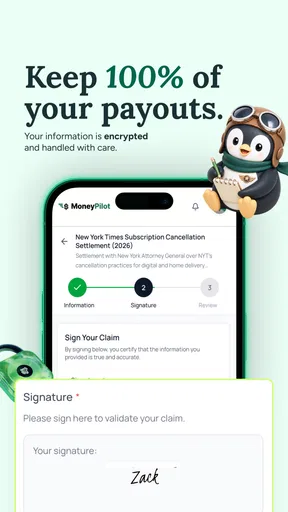
There is also a personal-data consideration that deserves practical attention. Any claim submission can involve information about purchases, accounts, or identity. I would avoid entering details casually, use only information needed for the claim, and review the wording of every form before sending it. The app can streamline the path to submission, but convenience should not make me careless with sensitive information.
Who gets the most value from it
MoneyPilot is best suited to someone who has heard about settlements but rarely follows them through. It may also help people who have several years of purchases and subscriptions to think through, especially when they want a single place to revisit possible opportunities. The app’s Everyone content rating makes it broadly accessible, and its minimum operating requirement is Android 7.0 or newer, which covers many older devices.
I can also see value for a user who is organized in some areas but inconsistent with administrative tasks. The person does not need to be a finance enthusiast. They simply need a repeatable way to look for claims, decide whether they appear relevant, and remember what happened afterward. The app’s focused design is more appealing in that situation than a large financial suite filled with features unrelated to settlements.
On the other hand, I would skip it if I already have a reliable claims-alert routine and a detailed spreadsheet that I maintain consistently. I would also skip it if my main goal is budgeting, debt payoff, investing, tax preparation, or account aggregation. Those needs call for different tools. MoneyPilot makes the most sense when finding and tracking claims is the actual problem I want to solve.
Before installing, I would also check device compatibility and the current app details. The release is dated January 19, 2026, and the current version is 1.0.55. The app has a 4.6 average from around two thousand ratings and has passed fifty thousand installs, which suggests a meaningful early user base without making it a universal finance platform. I would view those figures as context, not proof that every claim workflow will suit me.
What I would do after installing
I would first explore the claim-discovery area without rushing into a submission or purchase. I would learn how opportunities are presented, identify which details are needed to judge eligibility, and decide how often I want to check. A short recurring review is more realistic than opening the app every day, because settlement-related tasks are occasional and usually require careful reading.
Next, I would prepare a simple personal reference system outside the app: purchase confirmations, account emails, or notes about services I used. This is one of the less obvious ways to improve the experience. The app can help surface and track a claim, but my own records make the eligibility decision faster and more accurate. Keeping those records ready also reduces the temptation to submit vague or incomplete information.
Finally, I would review any paid option with the same skepticism I apply to other financial tools. I would ask whether it changes the part of the process I actually struggle with. If my problem is remembering to check, a purchase may not solve it. If my problem is understanding eligibility, I need clear claim instructions rather than simply more browsing. That distinction can prevent a small possible payout from turning into an unnecessary expense.
My overall recommendation
I find MoneyPilot: Class Action most convincing as a focused claims organizer, not as an all-purpose money app. Its central capability addresses a real everyday weakness: people may qualify for a settlement but forget to search, submit, or follow up. By placing those steps together, it can make the process feel more manageable and easier to revisit.
My recommendation comes with a clear condition: use it as a research and tracking aid, not as a substitute for reading eligibility rules or keeping your own records. Check each claim carefully, protect personal information, and be deliberate about in-app purchases. If you want budgeting or broader financial planning, choose a tool built for those jobs instead.
For the right user, the app’s value is modest but practical. It can turn an occasional search into a routine and keep a possible payout from disappearing into forgotten emails. I would recommend giving it a careful trial if settlement claims are the financial task I repeatedly postpone. If that is not a problem in my life, its specialized focus will probably feel unnecessary rather than transformative.
Verdict
Strengths of MoneyPilot : Class Action
- Tracks eligible class actions in one convenient place.
- Helps users discover settlements they may otherwise overlook.
- Claim-related information is presented in a simple, readable format.
- Useful reminders can help prevent missed filing deadlines.
- Free access lowers the barrier to checking potential compensation.
Limitations of MoneyPilot : Class Action
- Eligibility depends on personal details and the specific settlement rules.
- Claim amounts may be small or vary significantly between cases.
- Not every class action is available in every state or country.
- Users may need to submit supporting documents for certain claims.
- Settlement listings and deadlines can change over time.
Similar Picks in This Category
View All
Google Wallet
Google LLC4.3

Airtel: Recharge, Bank & Loans
Airtel4.0

PayPal - Pay, Send, Save
PayPal Mobile4.2

DANA Indonesia Digital Wallet
PT Espay Debit Indonesia Koe4.5

Binance: Buy Bitcoin & Crypto
Binance Inc.4.8

Cash App
Block, Inc.4.7
Frequently Asked Questions
What is MoneyPilot: Class Action, and what does the app do?
MoneyPilot: Class Action is designed to help users discover and review potential class action settlements and related consumer claims. The app may present information about eligible cases, important deadlines, estimated payment details, and instructions for submitting a claim. Before relying on any listing, read the official settlement notice carefully, because eligibility and payment conditions can vary from one case to another.
Is MoneyPilot: Class Action free to download and use?
The app can generally be downloaded without an upfront purchase, but users should review its current store listing and in-app disclosures for the latest information about fees, subscriptions, or optional services. A settlement claim itself should not require you to pay money merely to participate. Be cautious of requests for unnecessary payment or sensitive financial information, and verify important details through the official settlement administrator.
Can MoneyPilot: Class Action guarantee that I will receive settlement money?
No application can guarantee that a claim will be accepted or that you will receive a specific payment. Eligibility depends on the official settlement rules, the information you provide, the number of valid claims submitted, and the final court-approved distribution. MoneyPilot may help you find or organize opportunities, but the settlement administrator and court documents determine approval, payment amounts, and deadlines.
What personal information may be required when using the app?
Depending on the case, a claim may require details such as your name, contact information, purchase history, account records, or other proof of eligibility. Only provide information that is requested by the official claim process, and review the app’s privacy policy before continuing. Avoid entering passwords, full banking credentials, or identity documents unless the request is clearly legitimate and securely handled.
How should I verify a class action opportunity found through MoneyPilot?
Treat every opportunity as something to verify before submitting a claim. Check the case name, court information, settlement administrator, official website, eligibility requirements, filing deadline, and payment method against an independent source. Read the long-form notice instead of relying only on a summary in the app. If the information is unclear, contact the administrator directly using contact details published in official court or settlement materials.
